Pragmatic Approach to Authentication
Authentication is really about answering two questions: "who is calling?" and "what should I let them do?" Each method below evolved as we learned painful lessons about the previous one. Here's the landscape, then we'll walk through each with code and analogies.
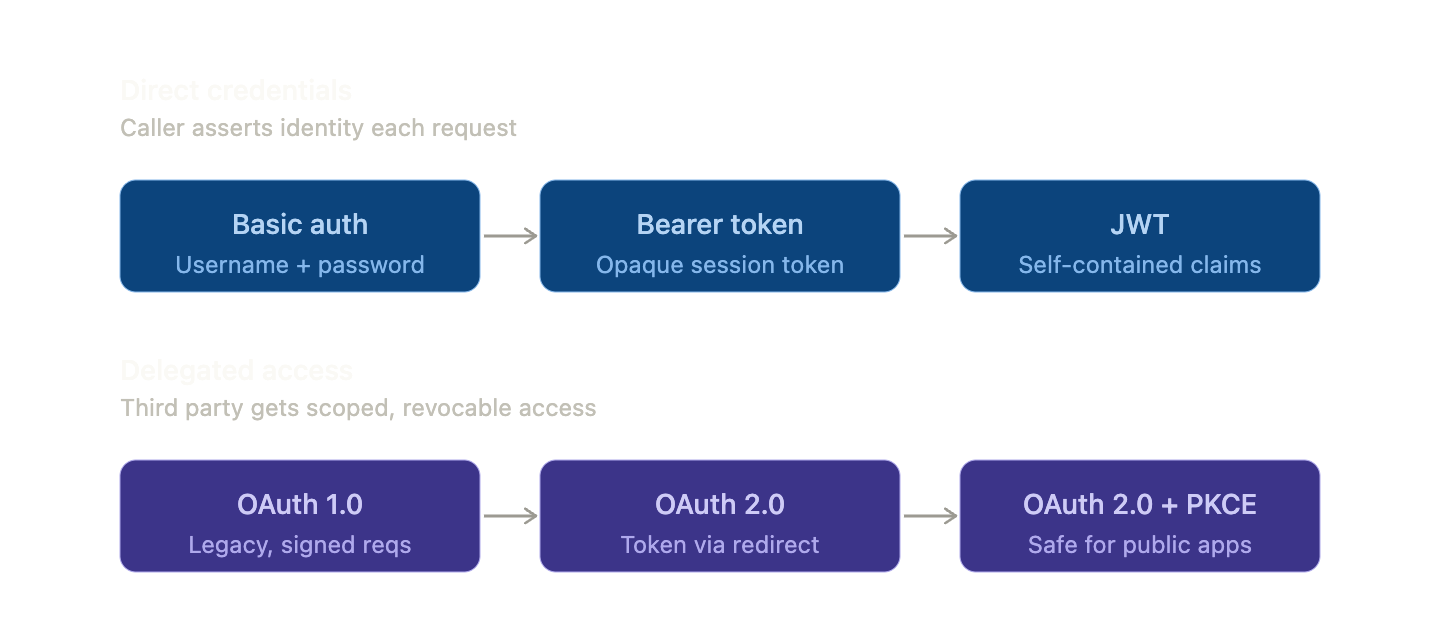
The two families differ in trust model. Direct credentials means the caller hands proof to the server with every request. Delegated access means the user lets a third party act on their behalf, scoped and revocable, without sharing the password. The OAuth family exists because "let this app post to your Twitter" used to be implemented by users handing apps their Twitter password — obviously a disaster.
1. Basic auth
Every request includes Authorization: Basic base64(username:password). Base64 is encoding, not encryption — anyone sniffing the request reads the password.
GET /api/orders HTTP/1.1
Host: api.example.com
Authorization: Basic dXNlcjpwYXNzd29yZDEyMw==
Real-life analogy: Showing your full passport to every gate agent, every time. Fast for one-off entries, terrifying if anyone's watching.
Pragmatic take: Acceptable for server-to-server inside a private network, internal admin tools behind a VPN, or local dev. Never for public APIs on anything but HTTPS, and even then the credentials sit in every log, proxy buffer, and request trace. In 2026, most production systems shouldn't be using this.
2. Bearer token
Authenticate once with a username/password, get back a token (a random opaque string), and send it on every subsequent request:
Authorization: Bearer 7a8f9b3c-d4e5-6f78-90ab-cdef12345678
Server-side, you look it up: SELECT user_id, expires_at FROM sessions WHERE token = ?. If valid, you know who's calling. The "session cookie + database lookup" pattern that powers most of the web is bearer auth in disguise.
Real-life analogy: A wristband at a music festival. Whoever wears it gets in — the bouncer doesn't re-check your ID and doesn't care if you bought it or your friend gave it to you. That's also the risk: a stolen wristband works just as well.
Pragmatic take: This is the workhorse of the web. Pros: simple, revocable (just delete the row), easy to audit, easy to invalidate everywhere when a password changes. Cons: every API call hits your session store, which is the pain point people then try to dodge with JWTs.
3. JWT (JSON Web Token)
A JWT is a bearer token that is also self-contained. It carries the user's identity and claims, signed by the server. No database lookup needed — the server just verifies the signature.
Structure is three base64url segments joined by dots: header.payload.signature.
eyJhbGciOiJIUzI1NiJ9.eyJzdWIiOiJ1c2VyXzQyIiwiZXhwIjoxNzE1MTAwMDAwfQ.aBcDeF...
Decoded payload:
{
  "sub": "user_42",
  "role": "admin",
  "exp": 1715100000,
  "iss": "auth.example.com"
}
Verification on the receiving service:
import jwt from 'jsonwebtoken';

try {
  const claims = jwt.verify(token, process.env.JWT_SECRET, {
    algorithms: ['HS256'],          // pin it explicitly
    issuer: 'auth.example.com',
  });
  // claims.sub, claims.role available — no DB hit
} catch (err) {
  return res.status(401).end();
}
Real-life analogy: A passport with a hologram. The customs officer doesn't phone the issuing country; they look at the hologram and the dates and trust it. The catch: if it's stolen while still valid, you can't easily cancel it before its expiry.
Pragmatic take. JWTs solve the stateless-scaling problem but introduce real footguns:
- Revocation is hard. You can't easily kill a JWT mid-life. Solutions: keep TTLs short (5–15 min) and rotate via refresh tokens, or maintain a deny-list (which kills the stateless advantage).
- Never put secrets in the payload. JWTs are signed, not encrypted. Anyone can decode them.
- Pin the algorithm in the verifier. The infamous
alg: nonebug and theHS256vsRS256confusion attacks have burned every major library. Always passalgorithms: [...]explicitly. - Use
RS256(asymmetric) when signers and verifiers are different services — otherwise everyone who verifies needs the signing secret.
A useful rule: if you find yourself building a deny-list, you've reinvented bearer tokens with extra steps. Use plain bearer tokens for sessions; reserve JWTs for short-lived access tokens between services or inside OAuth flows.
4. OAuth 1.0 (briefly)
OAuth 1.0 was the first widely-deployed delegation protocol. Every request was cryptographically signed with a shared secret and a nonce — complex to implement, painful to debug, but it worked over plain HTTP because the signature protected the request itself. Twitter used it forever; almost everyone else moved on once HTTPS became universal and the complexity stopped being worth it.
Pragmatic take: You only meet this maintaining legacy code. Don't pick it for new work.
5. OAuth 2.0
OAuth 2.0 is not really an auth protocol — it's an authorization framework with several "grants" (flows) for different situations. The most common is the Authorization Code grant:
- App redirects the user to
https://auth.example.com/authorize?client_id=...&redirect_uri=...&scope=read:orders&state=xyz. - User logs in at the auth server and grants consent.
- Auth server redirects back to the app with
?code=abc123. - App's backend POSTs
code+client_secretto/token, gets backaccess_token(often a JWT) andrefresh_token. - App calls the API with
Authorization: Bearer eyJ....
The backend exchange:
const res = await fetch('https://auth.example.com/oauth/token', {
  method: 'POST',
  headers: { 'Content-Type': 'application/x-www-form-urlencoded' },
  body: new URLSearchParams({
    grant_type: 'authorization_code',
    code,
    redirect_uri: 'https://myapp.com/callback',
    client_id: process.env.CLIENT_ID,
    client_secret: process.env.CLIENT_SECRET, // only safe on a server
  }),
});
const { access_token, refresh_token } = await res.json();
Real-life analogy: A valet key. You give the valet a key that starts the car and unlocks the doors but won't open the trunk, the glovebox, or the house. They can't sell your car or copy your house key. You stay in control; the valet gets just what they need.
Pragmatic take: This is the right answer any time you're integrating with someone else's account ("Sign in with Google", "Connect your Stripe"), and increasingly the right answer for first-party login too — delegating to your own identity provider (Auth0, Clerk, Cognito, Keycloak) rather than rolling auth from scratch. The client_secret is the linchpin of the classic flow: it proves the token request came from your backend, not someone who intercepted the redirect.
But that's exactly the problem with mobile and single-page apps — they have no backend to keep a secret.
6. OAuth 2.0 with PKCE
PKCE (pronounced "pixie", Proof Key for Code Exchange) is OAuth 2.0 for clients that can't keep a secret — mobile apps, native desktop apps, SPAs. A JS bundle shipped to a browser cannot hide a client_secret; anyone with devtools can extract it. PKCE replaces the secret with a per-login "prove you started the flow" check.
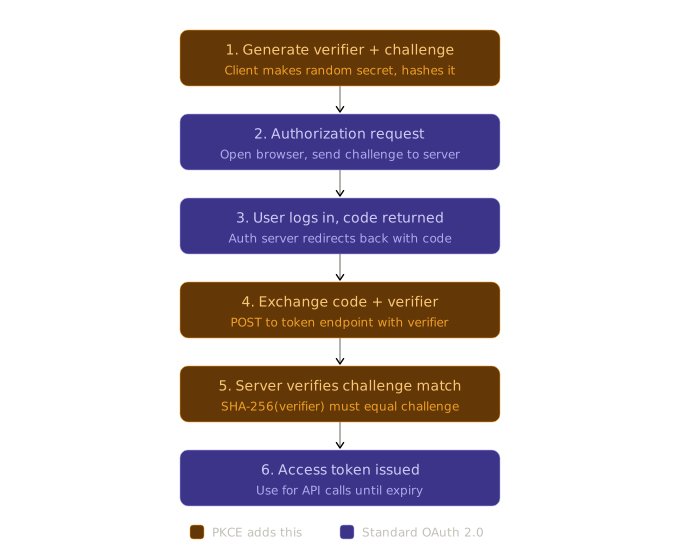
Here's a browser-side implementation:
// Step 1 — generate verifier and challenge, once per login attempt
const verifier = base64url(crypto.getRandomValues(new Uint8Array(32)));
const challenge = base64url(
  await crypto.subtle.digest('SHA-256', new TextEncoder().encode(verifier))
);

// Step 2 — stash the verifier, send the challenge with the auth request
sessionStorage.setItem('pkce_verifier', verifier);
location.href = `https://auth.example.com/authorize?` + new URLSearchParams({
  response_type: 'code',
  client_id: 'my-spa',
  redirect_uri: 'https://myapp.com/callback',
  code_challenge: challenge,
  code_challenge_method: 'S256',
  state: crypto.randomUUID(),
});

// Steps 4–5 — after redirect back with ?code=...
const res = await fetch('https://auth.example.com/oauth/token', {
  method: 'POST',
  headers: { 'Content-Type': 'application/x-www-form-urlencoded' },
  body: new URLSearchParams({
    grant_type: 'authorization_code',
    code: codeFromUrl,
    redirect_uri: 'https://myapp.com/callback',
    client_id: 'my-spa',
    code_verifier: sessionStorage.getItem('pkce_verifier'), // the proof
  }),
});
The auth server computes SHA-256(verifier) and compares it to the challenge it stored at step 2. Only the original client knows the verifier, so even if an attacker intercepts the redirect with the code, they can't trade it for tokens.
Real-life analogy: When you make a restaurant reservation by phone, you give a callback number. The restaurant calls that number to confirm — anyone overhearing your name can't claim the table because they don't have your phone. The verifier is your phone; the challenge is the number written on the reservation slip.
Pragmatic take: PKCE is the default for any client that isn't a backend in 2026. The OAuth 2.1 draft makes it mandatory for the authorization code flow regardless of client type — even confidential clients with a client_secret should use it, because it also defends against authorization-code-injection attacks. New SPA or mobile app? This is the flow.
Pragmatic recommendations
A senior engineer in 2026 picks roughly like this:
- Internal service-to-service inside a private network → mTLS, or short-TTL signed JWTs. Basic auth only when fully behind a VPN, never on the open internet.
- Traditional web app, first-party login → session cookies (bearer tokens under the hood). Don't reach for JWTs by default; the DB hit per request is fine, revocation is trivial, and you can iterate on the session model later.
- SPA or mobile app, first-party login → OAuth 2.0 with PKCE, with the access token as a short-lived JWT and refresh tokens rotated. Use a managed identity provider unless you have a very good reason not to.
- Third-party integrations ("Sign in with Google", "Connect your Stripe") → OAuth 2.0 in whatever flavor the provider supports, PKCE on if your client is public.
- B2B/API access for partners or background jobs → OAuth 2.0
client_credentialsgrant (machine-to-machine, no user in the flow), short-lived JWT access tokens.
The biggest gotcha across all of this: don't build identity yourself unless that's literally your product. Auth is one of those domains where you only find out you got it wrong years later, in a breach. Auth0, Clerk, Okta, AWS Cognito, Supabase Auth, self-hosted Keycloak — these exist precisely so it isn't a project you start from scratch. Pay the money or use the open source one; spend your time on what your product actually does.